Your PC's internet.
On your phone.
Over USB.
USB Relay shares your Windows computer's Ethernet or Wi-Fi connection with Android through a USB cable. Free, open source, and rootless, with a native desktop interface.
Early software, measured honestly. About 128 Mbps in the documented encrypted VPN test on a Galaxy S23 Ultra / Android 17. Gigabit speeds, broad device compatibility, and production reliability are not claimed. See test results.
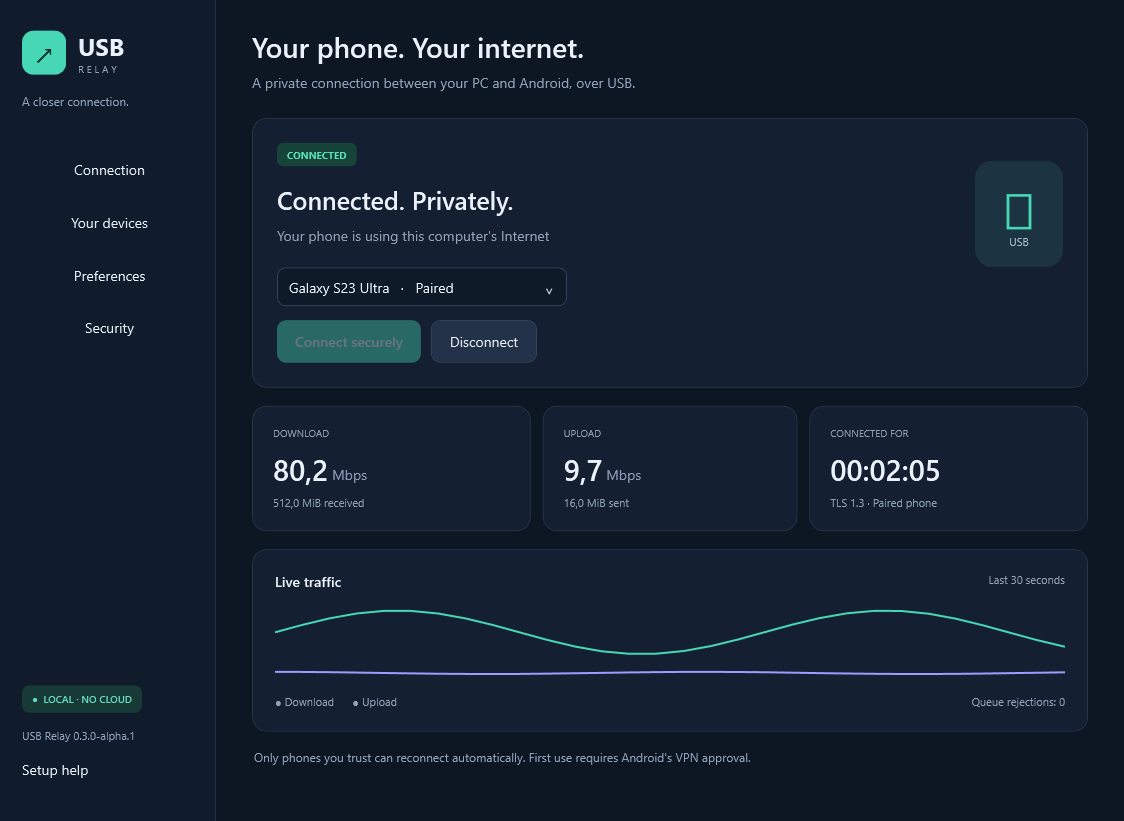
Built for everyday connection
Clear desktop controls
Pair a phone, connect, stop, and see traffic. Minimize to the tray and choose whether to start with Windows.
Reconnect automatically
Previously trusted phones reconnect when USB returns, subject to Android permissions and power policies.
Local and encrypted
TLS 1.3 mutual authentication, explicit first pairing, and no accounts, telemetry, ads, or cloud relay.
How to share Windows internet with Android via USB
- On the PC: download Setup.exe from GitHub Releases, install it, and open USB Relay. The .NET runtime is included.
- In Setup help: use an existing trusted ADB installation, or review Google's SDK terms and choose the verified direct download.
- On Android: enable Developer options and USB debugging. Connect a data-capable cable, unlock the phone, and authorize your computer.
- On the PC: select the phone and choose Trust & connect. The companion is installed automatically.
- On Android: tap Connect securely and approve the system VPN prompt.
Keep Android's ordinary USB tethering switch off: it shares internet in the opposite direction. The full guide covers Samsung settings, drivers, startup, updates, and troubleshooting.
A free Windows reverse-tethering alternative
USB Relay has its own backend and Android companion; it is not a Gnirehtet wrapper. Choose by platform and documented requirements. No comparative speed or stability advantage is claimed.
| Project | License / cost | Computer support | Setup |
|---|---|---|---|
| USB Relay | GPLv3 · free | Windows x64 · native GUI | ADB; Android USB and VPN approvals; public alpha |
| Gnirehtet | Apache 2.0 · free | Windows, Linux, macOS · official CLI | ADB; upstream says no longer actively maintained |
| Tetrd | Commercial · free trial | Windows, Linux, macOS | Desktop and Android app; Windows USB debugging |
| SimpleRT | GPLv3 or later · free | Linux, macOS; Windows under research | No ADB; console / system networking setup |
Questions before you connect
Does reverse tethering need root or mobile data?
No root is needed. The computer needs a working internet connection; phone traffic uses that connection through USB.
Can I share Ethernet internet to Android without Wi-Fi?
Yes. Your PC can receive internet through Ethernet and send it to the phone through USB. A USB-C connector alone does not guarantee SuperSpeed or gigabit throughput.
Does it replace my mobile hotspot?
USB Relay sends computer internet to Android. A mobile hotspot or Android's built-in USB tethering sends phone internet to other devices. File transfer is separate.
Is USB Relay a free Tetrd alternative with a Windows GUI?
Yes, for PC-to-Android reverse tethering. USB Relay is free under GPLv3, but is currently an alpha with limited device testing. It does not implement every feature of Tetrd.
Can I use another VPN at the same time?
Android permits one active VPN per profile. USB Relay uses that slot. It is not an anonymity service: internet traffic leaves through your PC.
What are the current limits?
Windows x64, Android 10+, one active phone, IPv4 TCP/UDP. General IPv6 and ICMP forwarding are not implemented. Windows binaries are not Authenticode-signed. Never disable antivirus or organization policies to run them.
Open source, with clear boundaries
Review the source, reproduce a measurement, or report a bug. No independent security audit is claimed. Android can fall back to Wi-Fi or mobile data after disconnection unless you configure and verify its VPN lockdown policy.
Report a vulnerability privately · Privacy · Contribute · Report a bug